What’s included • What you’ll still need • Typical build cost • System options • Real gameplay
Bring Your Build to Life — Your Way
Power up your arcade build with parts designed for total control and customisation.
Use your own PC, laptop, or Raspberry Pi to install the software and load your own games.
Whether you're setting up MAME, Batocera, LaunchBox, or another emulator, (Details and how-to install these are available in the Step-by-Step guide) this Starter Kit gi ves you the flexibility to create an authentic arcade experience from the software up. No preset menus — just pure DIY freedom.
🕹️ DIY Arcade Freedom In A Box
Skip the presets. Our Starter Kit delivers everything you need to build and customise your arcade — your games, your way. Unbox, wire, load, and relive the classics — no limits.
TAP FOR Full Kit Details (ESSENTIAL KIT)
2 x Arcade Joysticks (you choose colours and style post purchase)
16 x Arcade Push Buttons (6 Player 1, 6 Player 2 & 4 Main — 2 players - choose type/ colours post purchase)
16 x Micro switches - (connects your buttons to the wiring harness)
20 X Button Wiring Harnesses - (connect buttons to the encoder unit)
2 x USB Encoders – (link your joysticks and buttons to your Pi or PC)
2 x USB Cables – (clean, reliable connection to your emulator)
Twin Thermo Fan Kit (keep your cabinet cool)
200W Arcade Amplifier (with AU plug + RCA cables)
50cm VGA Cable (for clean monitor connection)
10M of Premium 19mm T-Moulding (choose your colour post purchase)
T Moulding Router Bit - (cuts the perfect size slot to match our T-Moulding)
Bonus: Free pack of cable hooks for clean wire management
Every Kit includes our official Arcade Revival Starter Kit Instruction Booklet
Real Builds From Our Customers
🕹️Load Your Own Games
Take full control of your arcade experience by loading your own legally acquired game files. From classic arcade titles to retro consoles, this kit gives you the flexibility to customise your library for the most authentic, nostalgia-packed build possible.
Supports a wide range of arcade and console game formats — perfect for creating a personalised game lineup.
Need help installing? We’ll show you exactly how to set everything up — including how to install the emulator, configure your buttons, and load your own games onto your system.
Connect your way — Build your arcade with a PC, laptop, or Raspberry Pi. Total flexibility, zero limits.
Build. Customise. Relive.
This kit is for the tinkerers, the modders, and the dreamers who want full control over their arcade's software. Combine it with your Arcade Revival Step-by-Step Guide, and you’ve got everything you need to bring the magic back, exactly how you remember it.
Whether it’s for your game room, your kids, or just your inner child, this kit helps you build your own retro revival, one button at a time.
Your Build, Your Way — What's the Difference?
Not sure which setup is right for you? Compare the plug-and-play convenience of our Pre-loaded games kit with the full flexibility of the Custom Emulator kit — and find your perfect arcade build.
How Long Does Shipping Take?
Items are dispatched within 24hrs through Australia Post and take 2-10 days or 1-4 days using our express option.
Overseas orders take roughly 5 - 20 days depending on your location.
(Any Pre-Order purchases take approximately 2 - 3 weeks)
Start with our $29 Digital Build Guide
and source your own parts,
or choose a Starter Kit with all compatible components bundled together,
and the Guide included FREE!
OPTION 1
Essential Build Kit
$359
Everything you need to get started to build and play.
MAKE IT YOURS 🕹️
After purchase, choose your button style & colours, T-moulding & more via our Preferences Form.
BEST FOR
Core components for builders who want to finish the rest themselves.
✓Digital Build Guide
✓Build System: Pre-loaded or Emulator
✓Buttons & Joysticks
✓Wiring & Harnesses
✓T-Moulding + Router Bit
✓Cooling Fans + Amplifier kit
✓RCA Leads + VGA & All A/C Adapters
✓Wiring Diagrams & Starter Kit Booklet
✓Video Tutorials + Build Support
YOU'LL PROVIDE
MDF, 24-inch monitor, basic tools and a cabinet finish.
From choosing the right Starter Kit to building and playing your dream arcade, we've got your questions covered.
01. About the Starter Kits
Everything you need to know before getting started.
What's included in the Starter Kit?
Our Starter Kits are available in three options: Essential, Complete and Ultimate. Each kit includes the core components needed to build your own arcade machine, with higher tiers adding more features, convenience and customisation. The Essential Kit includes the core electronics and controls, the Complete Kit adds popular upgrades and finishing components, and the Ultimate Kit includes everything in the Complete Kit plus a Full Wrap Kit and additional extras for the most complete build experience.
How do I choose my buttons, joysticks, T-moulding, etc.?
Afteryou purchase a Starter Kit, you'll automatically receive an email with a Preferences Form specific to your chosen kit.
Here, you can select your preferred button styles and colours, joystick tops, T-moulding colours and more, depending on your kit.
We'll then personally assemble and dispatch your Starter Kit according to your selections!
IMPORTANT: Please check your junk/spam folder if you don't see the email in your inbox.
Does the Starter Kit include the Digital Build Guide?
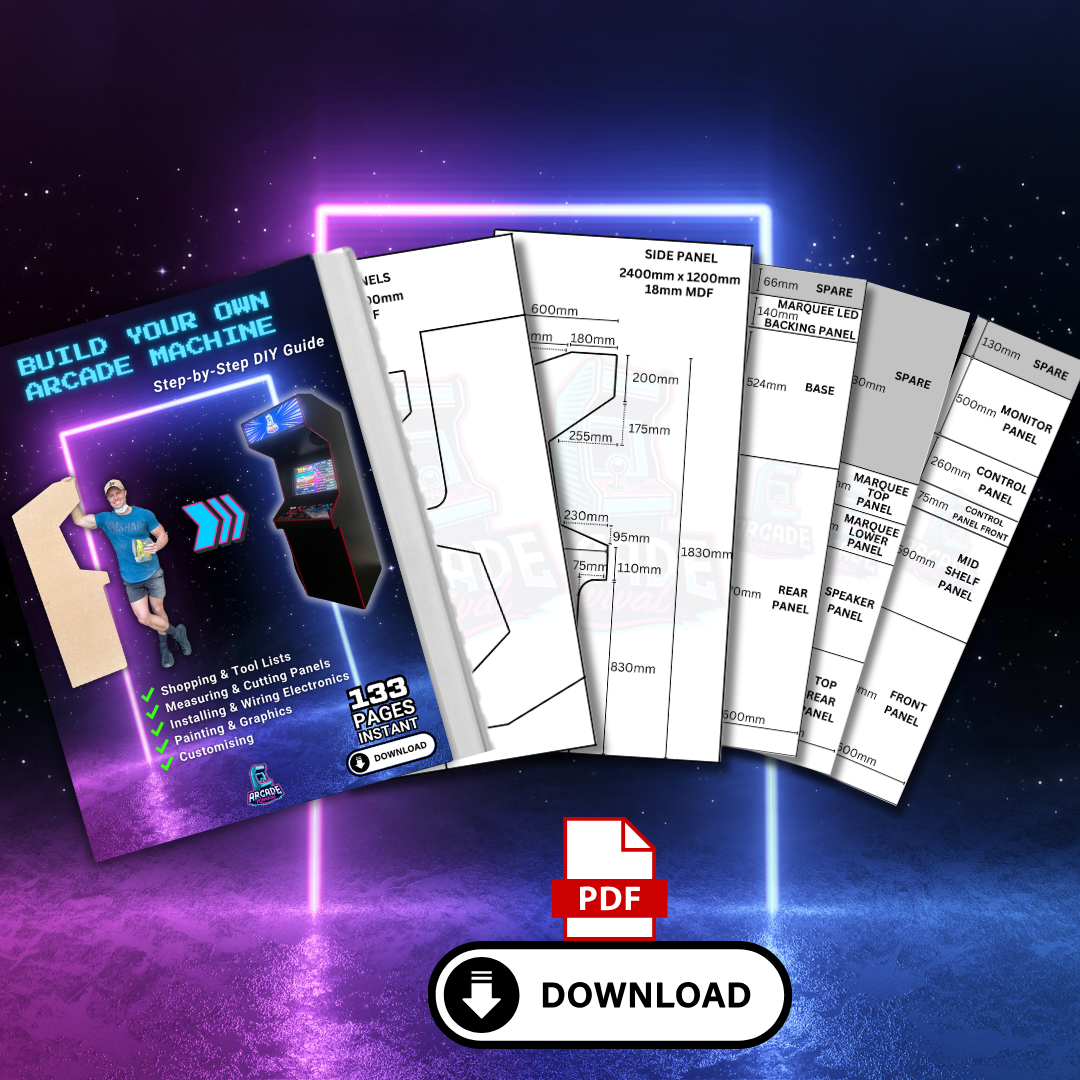
Absolutely! Every Starter Kit includes our comprehensive 134-page Digital Build Guide, featuring step-by-step instructions, detailed cabinet plans (Metric & Imperial), printable templates, materials lists, wiring diagrams and instructional video tutorials to guide you through your entire build.
You'll also receive instant digital access and FREE lifetime updates, so you'll always have the latest version!
Do I need to purchase anything else to finish my arcade machine?
Yes, you'll just need to source your own MDF timber, a 24-inch monitor and some basic tools to build your arcade cabinet.
Depending on which Starter Kit you choose, you may also want to add your own finishing touches, such as paint or one of our Full Cabinet Wrap Kits.
We've made the process simple with detailed shopping lists with links, cabinet plans and step-by-step instructions included in your Digital Build Guide!
Is the Starter Kit suitable for beginners?
Yes! Our Starter Kits are designed for beginners and first-time builders, with no previous arcade-building or electronics experience required.
We've taken the guesswork out of sourcing compatible components, and every kit includes our comprehensive 134-page Digital Build Guide, complete with step-by-step instructions, wiring diagrams and video tutorials to guide you through the entire process.
With a few basic tools, some patience and a little DIY enthusiasm, you can build your own arcade machine! 🕹️
02. Building Your Arcade
Skills, tools, costs and everything in between
Can I actually build this?
Most of our customers are first-time builders.
Many have little to no woodworking experience and build theirs in garages, sheds and driveways using basic DIY tools.
If you can measure, cut and follow instructions — you can absolutely build this 🕹️
What if I mess it up?
Don’t stress - almost every builder worries about this.
MDF is forgiving to work with, and most mistakes are usually minor and easily fixable along the way.
The guide walks you through every step of the build process, with clear instructions, diagrams and visual support to help keep you on track. So if you can follow instructions, you can build an arcade machine.
We’ve also created helpful video walkthroughs covering key stages of the build, making it even easier to follow along with confidence.
And if you ever get stuck, we’re always here to help with support along the way.
The biggest thing? Take your time and enjoy the process 🕹️
Don't have every tool? No problem! Many builders borrow or hire what they need.
Our Build Guide explains which tools are required, how they're used and where to source them, so you can plan your build with confidence.
How difficult is the wiring?
Easier than you might think!
Our Starter Kits include clear, visual wiring diagrams showing exactly how to connect your arcade controls, with no previous arcade electronics experience required.
We've also created step-by-step video tutorials for both Classic HAPP and LED button setups, so you can follow along and wire your controls with confidence.
We strongly recommend a 24-inch monitor for our 2-player upright arcade cabinet design. Bigger isn't always better!
Our entire build system has been carefully designed around this size for several important reasons:
Optimal arcade ergonomics: A comfortable viewing distance while maintaining the authentic proportions and feel of a classic arcade machine.
Cabinet dimensions: Our plans are specifically designed around a 24-inch monitor, ensuring everything fits together as intended.
Artwork compatibility: Our Full Cabinet Wrap Kits and screen surrounds are designed to suit these exact cabinet measurements.
Affordable & accessible: 24-inch monitors are widely available, relatively inexpensive and easy to source, even second-hand!
Thinking of going bigger? Keep in mind that a larger monitor may require significant changes to the cabinet's internal width and overall construction, which can also affect the fitment of our artwork and templates.
For the easiest build and best results, we recommend sticking with our tried-and-tested 24-inch design.
Can I use a modern LCD monitor or a classic CRT?
Absolutely! Our Build Guide is designed around using a modern LCD monitor, which we recommend for its affordability, reliability, lighter weight, sharp picture and ease of installation.
Prefer that authentic old-school CRT experience? That's possible too, although it requires additional planning, modifications and specialist knowledge.
For most builders, we recommend sticking with a 24-inch LCD monitor for the best balance of classic arcade proportions, practicality and ease of construction.
Can I retrofit an existing arcade cabinet?
Yes, it's possible. We've had customers successfully use our Starter Kits to restore, upgrade and retrofit older arcade cabinets.
However, our entire build system, including our Build Guide, Starter Kits, components and Wrap Kits, has been carefully designed to work together for maximum compatibility and ease of installation.
Please note: As existing arcade cabinets vary significantly in design, dimensions, wiring and electronics, we cannot guarantee compatibility or provide technical support for custom retrofits and third-party cabinet conversions.
For the easiest building experience and best results, we recommend following our original Arcade Revival cabinet plans.
How much will the total cost be to build?
The great thing about building your own arcade cabinet is that you control the budget!
You can build a fantastic, fully customised arcade machine for well under $1,000 AUD, including your Starter Kit, MDF, monitor and finishing materials. The final cost depends on your chosen kit, materials and optional upgrades.
Our Starter Kit comparisons above provides estimated total build costs to help you plan, and you can always add upgrades and customise your cabinet over time!
Best of all? You'll learn valuable skills along the way and end up with a one-of-a-kind arcade machine you built yourself, something you and your family can enjoy for years to come. Nothing beats that! 🕹️
How long does it take to complete?
Most customers tackle the project over a few weekends or spend a few hours each day working through the stages. There's no rush! Enjoy the process and build at your own pace!
Is building an arcade cabinet a good family project?
Yes! We've seen so many fantastic father-and-son builds and entire families getting involved. Watching your arcade cabinet come to life together is an exciting and rewarding experience, creating memories that will last a lifetime!
03. Games & The Finished Experience
Bringing your dream arcade to life
What games can I play with the Emulator Starter Kit?
The possibilities are almost endless! Our Emulator (BYO PC) Starter Kit allows you to play a huge variety of classic arcade and retro console games using your own PC and emulation software such as Batocera, LaunchBox or MAME.
Unlike our Pre-loaded system, you're free to build and customise your own games library, with the games and systems you can run depending on your PC hardware and chosen software.
Want an easier way to get started? We also offer a Batocera Boot Drive USB, preconfigured with Batocera and a small selection of games, including DOOM Shareware. Simply boot from the USB and add your own legally obtained games to the appropriate folders! - Learn more about our Batocera Boot Drive USB
Pre-loaded vs Emulator: What's the difference? And can I upgrade later?
Both options are designed to bring your arcade to life, but offer different levels of convenience and customisation.
Pre-loaded (Pandora): Our most beginner-friendly option, featuring approximately 9,800 pre-loaded classic games. It's a simple plug-and-play solution, perfect for getting your arcade up and running with minimal setup.
Emulator (BYO PC): Ideal for those wanting greater flexibility, performance and customisation. Connect your own compatible PC and choose your preferred emulation software, games and settings. You're in control of your entire arcade experience!
The best part? You're not locked into either system! Our cabinet design allows you to upgrade or change your build system later as your skills and interests grow.
If you enjoy tinkering, customising your games library or want the freedom to expand your arcade's capabilities, the Emulator build system is a fantastic choice! 🕹️
What computer do I need for the Emulator build system?
Our Emulator (BYO PC) Starter Kit is compatible with a wide range of computers, including desktop PCs, mini PCs and Raspberry Pi systems, so you don't need an expensive gaming PC to get started!
A basic PC or Raspberry Pi can be great for playing classic arcade and retro games, while more demanding games and newer console systems may require more powerful hardware.
The choice is yours! Simply choose a compatible system that suits your budget, preferred games and emulation software.
Please note: The computer or Raspberry Pi is not included with the Emulator Starter Kit.
Can I customise my games library and arcade menu?
Yes! One of the biggest advantages of the Emulator (BYO PC) build system is the freedom to customise your entire arcade experience!
Popular emulation platforms such as Batocera, LaunchBox and MAME offer different interfaces, features and customisation options, allowing you to choose a setup that suits your preferences.
Depending on your chosen software, you can:
Create your own games library with your favourite arcade and retro console titles.
Customise the appearance of your arcade menu with themes, artwork and layouts.
Organise and browse games by console, category or favourites.
Configure controls and settings to suit your preferred games.
Expand your collection and customise your setup over time.
And don't worry, it doesn't have to be complicated! Platforms like Batocera offer user-friendly interfaces, and our optional Batocera Boot Drive USB provides an easier starting point, allowing you to add your own games without installing an operating system from scratch.
Whether you prefer a simple, classic arcade menu or a fully customised gaming experience, the choice is yours! 🕹️
Is there an easier way to get started with emulation?
Yes! If you'd prefer an easier way to get started, our Batocera USB Boot Drive takes much of the guesswork out of setting up your own Emulator system!
The USB comes pre-flashed with Batocera, a user-friendly emulation operating system, along with a small selection of games, including DOOM Shareware, so you can explore the system straight away.
Simply connect the USB to a compatible PC, boot into Batocera and add your own legally obtained games by dragging and dropping them into the appropriate folders!
There's no need to install an operating system or configure everything from scratch, making it a great starting point for beginners who want the flexibility of an Emulator without the complicated setup.
Please note: Our Batocera USB Boot Drive is designed for compatible PCs and is not suitable for Raspberry Pi systems.
Can I add a trackball or light guns to my arcade cabinet?
Yes! One of the great advantages of our Emulator (BYO PC) build system is the flexibility to add additional controls, including USB trackballs, light guns and other compatible peripherals!
Trackballs: Our RGB USB Trackball features a direct USB connection, making it easy to connect and typically plug-and-play with most compatible Emulator systems! Enjoy classic trackball games with smooth, full 360-degree movement, with configuration or calibration depending on your chosen software.
Light Guns: We're currently developing light gun options for our Emulator build system! These are planned for a future release, although we don't have a confirmed availability date just yet.
Please note: Compatibility, calibration and setup will depend on your chosen PC hardware, emulation software and peripherals.
Our arcade cabinets are designed with future upgrades in mind, giving you the freedom to expand and customise your gaming experience over time!
Will my wife kill me? 😅
We can’t guarantee anything…
But many customers tell us the arcade machine they were “definitely building for themselves” quickly becomes everyone’s favourite thing in the house 😄